Best Way to Use ChatGPT in 2026: What I Learned After Months of Daily Use
Introduction
Finding the best way to use ChatGPT in 2026 took me a lot longer than I expected, mostly because I started out doing everything wrong. For the first few weeks I typed vague one-line prompts, got generic answers, and assumed the tool just wasn’t as good as everyone claimed.
It took me a while to realize the problem wasn’t ChatGPT, it was how I was using it. Once I actually slowed down and figured out a proper system, everything changed. My prompts got sharper, my results got better, and my daily workflow genuinely improved.
This isn’t a technical manual written by someone reading documentation. Everything here comes from my own trial and error, my own frustrating dead ends, and eventually, my own system that actually works. If you’ve ever felt like ChatGPT wasn’t living up to the hype, I think this will change your mind.
What Is ChatGPT?
ChatGPT is an AI chatbot built to understand natural language and respond conversationally, almost like texting a very well-informed friend. You can ask it questions, give it tasks, or just think out loud with it.
What makes it different from a search engine is that it doesn’t just hand you links, it actually generates a direct, tailored response based on what you’re asking. It can write, summarize, explain, translate, and even hold context across a long back-and-forth conversation, which is a big part of why it feels less like a tool and more like an ongoing collaboration.
It’s also become genuinely multimodal, meaning it can work with images and voice input, not just plain text. If you want the technical specifics straight from the source, OpenAI’s official ChatGPT page breaks down the latest capabilities and model options in detail. That’s a big part of why finding the best way to use ChatGPT in 2026 makes such a noticeable difference in how useful it feels day to day, since the possible use cases have expanded so much beyond simple text replies.
Why ChatGPT Still Matters in 2026
With so many AI tools competing for attention now, I get asked constantly why I still lean on ChatGPT so heavily. Honestly, it comes down to versatility. Few tools handle writing, brainstorming, coding help, and casual conversation all in one place this well.
Students use it to simplify tough concepts. Freelancers use it to speed up client work. Business owners use it to draft everything from emails to marketing copy. Once you learn the best way to use ChatGPT in 2026 for your specific needs, it stops feeling like a novelty and starts feeling like an actual assistant.
ChatGPT isn’t the only tool doing this well, either. I actually rounded up several others worth knowing about in my Top 10 AI Tools in 2026 roundup, where I go through how they compare for different tasks and workflows.
How to Use ChatGPT Effectively (My Real System)
This is the part I wish someone had explained to me earlier. Here’s exactly what changed my results.
Write Prompts Like You’re Briefing a Colleague
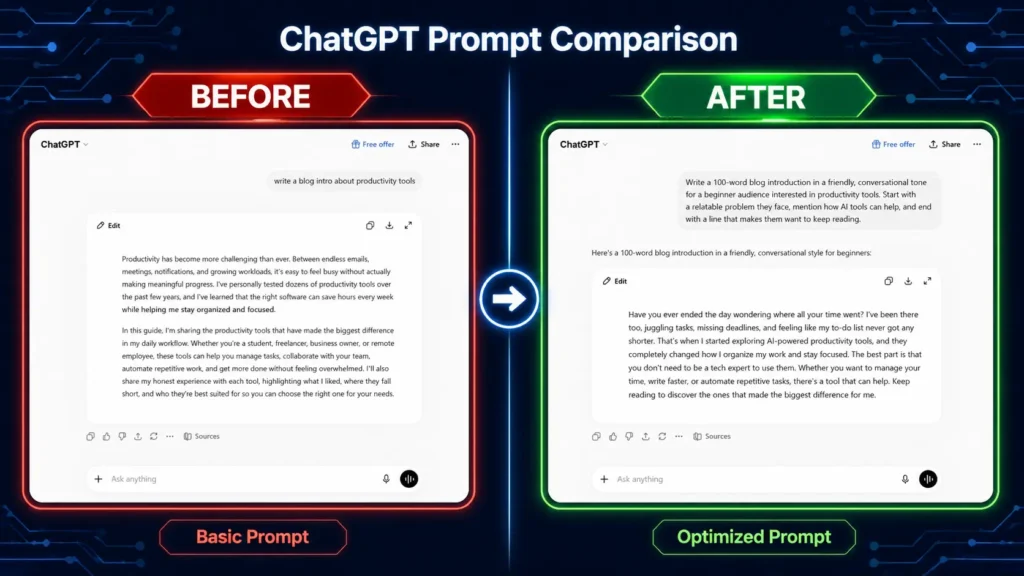
I used to type short, vague requests and expect magic. That rarely worked. Once I started writing prompts the way I’d brief a new employee, giving context, tone, and a clear goal, the quality of responses jumped dramatically.
For example, instead of asking “write a blog intro,” I now say something like “write a 100-word blog introduction in a friendly, conversational tone for a beginner audience interested in productivity tools.” That small shift alone is one of the biggest parts of the best way to use ChatGPT in 2026.
Choose the Best ChatGPT Model for the Task
One question I get a lot is what is the best ChatGPT model to use, and honestly, it depends on what you’re doing. For quick, casual tasks, a faster model works fine. For deeper reasoning, complex writing, or detailed analysis, switching to a more advanced model makes a real difference in accuracy and depth.
I learned to match the model to the task instead of always defaulting to whatever loads first. That one habit saved me from a lot of shallow, rushed-feeling answers.
Use Custom GPTs for Repetitive Tasks
Custom GPTs became a genuine time-saver once I set them up properly. I built one specifically for outlining blog posts and another for drafting client emails, each with instructions baked in so I don’t have to repeat context every single time.
If you do the same type of task often, this is honestly one of the most underrated parts of the best way to use ChatGPT in 2026.
Lean on Memory and Context
ChatGPT’s memory feature means it can recall details across conversations instead of starting from zero every time. I use this to keep track of ongoing projects, writing style preferences, and recurring client details.
It feels less like restarting a conversation and more like continuing one, which genuinely changes how natural the whole experience feels.
Use It for Creative Writing, Not Just Efficiency
I was surprised by how ChatGPT helps with creative writing beyond just speeding things up. When I’m stuck on a story idea or need a fresh angle for a blog post, I use it almost like a brainstorming partner, bouncing ideas back and forth until something clicks.
It won’t replace your own creative voice, but it’s excellent at helping you break through a blank page moment.
Use It for Research, Then Verify
ChatGPT is great for quickly understanding a topic, but I’ve learned not to treat it as a final source, especially for anything time-sensitive or highly factual. For research-heavy work, I often pair it with a tool built specifically for citation-backed answers.
My Perplexity AI Review covers exactly this kind of workflow, where I explain how I use both tools together depending on the task.
Use It Alongside Coding Tools, Not Instead Of Them
For actual software development, I’ve found dedicated coding assistants handle context and debugging far better than a general chatbot. I use ChatGPT for quick logic explanations, but for daily coding work, I rely on something built specifically for that.
I go into this in detail in my Cursor AI Review, where I compare general AI chat tools against purpose-built coding assistants.
ChatGPT Tips and Tricks I Wish I Knew Sooner
A few small habits made a noticeable difference in my results. Being specific about tone and audience upfront saves multiple back-and-forth edits. Asking ChatGPT to “ask me clarifying questions first” before generating a full response often leads to far more accurate output.
Breaking big tasks into smaller steps instead of one giant prompt also produces cleaner, more focused answers. And reviewing everything before publishing or sending it, always, is non-negotiable no matter how good the response looks.
Beyond those basics, I’ve also found it helpful to give ChatGPT examples of the style I want, rather than just describing it. Pasting in a short sample of my own past writing and asking it to match that voice consistently produces far better results than a vague instruction like “write casually.”
Another habit that’s paid off is asking for multiple versions of the same output at once, then picking and combining the best parts. Instead of accepting the first draft, I’ll often ask for three different angles on the same paragraph and blend them into something better than any single version alone.
How ChatGPT Fits Into My Daily Productivity
Looking back, ChatGPT has quietly worked its way into almost every part of my workday. Drafting first versions of content takes a fraction of the time it used to. Answering quick questions no longer means switching tabs and losing focus.
Even simple tasks like organizing thoughts before a meeting or summarizing long email threads have gotten faster. Planning my week, breaking down a big project into smaller steps, or just talking through a decision out loud has become part of my regular routine, almost like having a thinking partner available whenever I need one.
None of this replaced my own thinking, it just removed the friction around getting started. That’s honestly the biggest productivity shift, not that the tool does the work for me, but that it clears away the mental clutter that used to slow me down before I even began.
Common Mistakes People Make With ChatGPT
I made most of these myself before figuring things out. Being too vague with prompts is probably the biggest one, since generic input almost always leads to generic output. Something like “write me content” gives ChatGPT almost nothing to work with, while a specific brief with tone, audience, and purpose gives it real direction.
Trusting every factual claim without double-checking is another common trap, especially for anything recent or highly specific. I’ve seen confident-sounding answers turn out to be slightly off on dates, statistics, or niche details, which is exactly why verification still matters even when the response reads convincingly.
Treating every response as final, instead of refining it further, means missing out on noticeably better results that are often just one follow-up prompt away. And finally, not giving it enough context about your specific situation, business, or audience is a missed opportunity. The more relevant background you provide, the less generic and more genuinely useful the output becomes.
ChatGPT vs Other AI Tools
Since people often ask how ChatGPT stacks up against other tools I use, here’s my honest take. For everyday conversation and general tasks, ChatGPT remains incredibly strong and beginner-friendly. For citation-backed research, I lean toward Perplexity AI instead. For serious coding work, Cursor AI handles context and debugging far more effectively.
I’ve also spent time with Claude AI for longer writing projects, and it handles detailed, multi-step instructions impressively well. None of these tools completely replace ChatGPT for me, they just fill in the gaps depending on the task at hand.

Who Should Use ChatGPT?
Students benefit hugely from simplified explanations of complex topics, especially when a textbook explanation just isn’t clicking. It’s like having a patient tutor available at any hour, willing to rephrase the same concept as many times as needed.
Freelancers save real time drafting proposals, emails, and content outlines, which matters a lot when you’re juggling multiple clients with different tones and expectations. Bloggers and content creators use it to speed up first drafts without losing their own voice, especially once they’ve taught it their preferred style through examples.
Small business owners use it for everyday communication and quick marketing copy, often without needing to hire outside help for smaller tasks. Even people who aren’t especially tech-savvy find it approachable once they get past the first few awkward prompts, since the learning curve really does flatten out fast with a little practice.
Free vs Paid ChatGPT
The free version is genuinely solid for casual, everyday use, and it’s where I’d recommend anyone start. Once you’re relying on it daily for real work, though, the paid plan’s faster responses, higher usage limits, and access to more advanced models start to feel worth the cost.
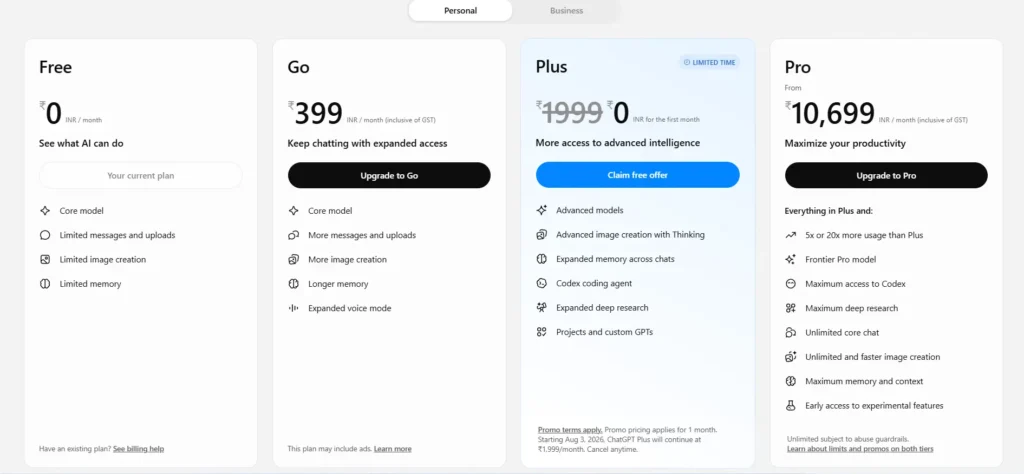
My honest advice is simple: start free, figure out your own version of the best way to use ChatGPT in 2026, then upgrade once you actually hit the free plan’s limits.
My Honest Take After Months of Use
If you asked me a year ago, I would have said ChatGPT was impressive but a bit overrated for daily work. Now, after actually figuring out the best way to use ChatGPT in 2026 for my own workflow, I genuinely can’t imagine going back to working without it.
The biggest shift wasn’t the tool itself, it was how I approached it. Once I stopped treating it like a search engine and started treating it like a collaborator, everything clicked. That mindset shift matters more than any single feature or setting.
Conclusion
At the end of the day, finding the best way to use ChatGPT in 2026 isn’t about memorizing a hundred tricks, it’s about being intentional with how you prompt it, which model you choose, and which tasks you actually hand over to it. Once that clicks, the results speak for themselves.
Whether you’re a student, freelancer, blogger, or business owner, there’s a version of the best way to use ChatGPT in 2026 that fits your specific workflow. Start simple, stay curious, and don’t be afraid to experiment until you find what genuinely works for you.
You might also like