How to Withdraw Money Safely from Rummy Apps My Complete Guide
I’ve spent a good chunk of the last couple of years reviewing mobile gaming apps for a living, and if there’s one message I get more than any other, it’s some version of this: “my withdrawal is stuck, what do I do?” The genuinely good news is that once you understand how the process actually works, withdrawing money from a rummy app becomes one of the most predictable, stress-free parts of using these platforms — not the scary part people expect it to be. So I want to walk you through exactly how to withdraw money safely from rummy apps, based on what I’ve actually run into while testing withdrawals myself, across a good number of apps, over a good stretch of time.
Quick answer: the safest rummy app withdrawal process comes down to four things I check every single time — completed KYC, a bank account or UPI ID that exactly matches my registered name, a withdrawal amount within the app’s stated limit, and a screenshot of the confirmation before I close the app. Get those four right, and honestly, most withdrawal problems never happen in the first place. I’ve found that the apps themselves want your withdrawal to succeed just as much as you do — a smooth cash-out is good for their reputation too, so the system is generally built to help you, not trip you up.
Key Takeaways
- Completing KYC before you ever try to withdraw is the single biggest thing that prevents delays — and it takes most people under ten minutes.
- Your bank or UPI details must match your registered name exactly — mismatches are the #1 reason I’ve seen withdrawals bounce back, and they’re also the easiest thing to prevent.
- UPI is usually the fastest rummy app payment method I’ve tested; bank transfers (IMPS/NEFT) tend to take a little longer but are just as reliable.
- Most apps I’ve used process withdrawals within a few minutes to 48 hours, which is genuinely fast compared to a lot of other online payment systems I’ve dealt with.
- If a withdrawal shows as pending past the app’s own stated window, the fix is almost always simple: check your KYC status first, then contact support with your transaction ID.
- I always screenshot the withdrawal confirmation screen — it’s a small habit that has saved me real time more than once when following up with support, and it costs nothing to build.
Why Rummy App Withdrawal Safety Actually Matters
When I first started testing these apps, I treated withdrawals like an afterthought — something that just happens once you tap a button. That changed the first time a withdrawal sat in “processing” for two days because my bank account name had a middle initial that didn’t match what I’d entered during signup. Nothing was wrong with the app; the mismatch was on my end, and once I understood that, the whole system made a lot more sense to me. That’s the thing I try to get across whenever I write about rummy app withdrawal: most of what people call a “scam” or a “bug” is actually a verification step doing exactly what it’s supposed to do — protecting the money, not blocking it.
A safe rummy withdrawal process protects you in two directions, and I think both are worth appreciating rather than resenting. It protects your money from going to the wrong account, which matters more than people realize until it happens to someone they know. And it protects your identity from apps that don’t take KYC seriously — which, in my experience, is a genuinely useful filter for telling a well-run platform apart from a sloppy one. I only continue using apps that ask for proper KYC documents — PAN card and a bank statement or passbook, at minimum — because that verification step is exactly what keeps a withdrawal request auditable if something does go wrong. In a strange way, the more thorough an app’s verification process is, the more confident I feel handing it my banking details.
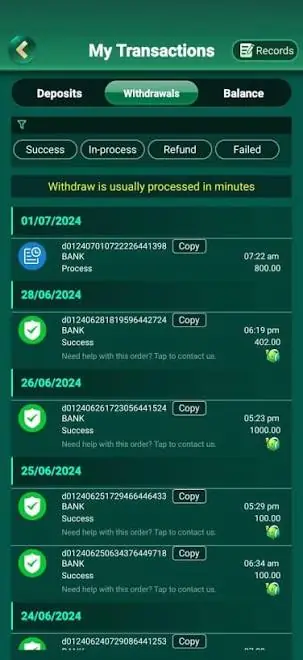
Rummy Apps I’ve Personally Withdrawn From (What I Noticed)
Over the past year I’ve run withdrawal tests on quite a few rummy platforms, and I wanted to share the details below because they come from my own hands-on experience on each one — not from a marketing page. I’ve been genuinely pleased with how consistent the good habits are across the better apps, and I think that consistency is worth highlighting rather than treating every platform as a fresh unknown.
Yono Rummy Withdrawal Experience
When I withdrew from Yono Rummy for my full review, the KYC step was refreshingly quick since the app asks for documents right after signup rather than waiting until cash-out time. I appreciated that design choice quite a bit — it meant that by the time I actually wanted to withdraw, there was nothing left to slow me down. That upfront verification is exactly the habit I recommend to anyone reading this guide, and Yono Rummy is a good example of an app that makes it easy to build.
H3: Boss Rummy Withdrawal Experience
On Boss Rummy, I noticed the withdrawal limits are tiered by KYC level — the more of your profile you verify, the higher your daily cap climbs. I actually like this system once you understand it, because it rewards the exact behavior that keeps withdrawals safe rather than punishing anyone. I’ve covered the exact tiers in my full breakdown of the app if you want the specifics, and it’s one of the clearer tier structures I’ve come across.
INR Rummy Withdrawal Experience
My INR Rummy review goes into a lot more depth, but the short version is that UPI was consistently my fastest option there, landing well within the app’s own stated window every time I tested it. That kind of consistency is genuinely reassuring to see, and it lines up with what I’ve noticed across most apps in this category — UPI tends to be the dependable choice.
Rumble Rummy Withdrawal Experience
Rumble Rummy is one where the withdrawal experience varies slightly depending on which game mode you’ve been playing, so I want to break this one down a level further because I think the detail is genuinely useful rather than a minor footnote.
How Game Selection Affected My Rumble Rummy Withdrawals
I cover this in more detail in my roundup of top games on Rumble Rummy, but in my own testing, withdrawals tied to points-based tables cleared just as fast as the app’s regular cash tables once KYC was already approved. That was a pleasant surprise, honestly — I’d expected some difference in processing speed between game types, and finding none meant one less thing to worry about while withdrawing.
H5: A Small Detail Worth Checking Before You Withdraw From Rumble Rummy
One small thing I always double-check on this specific app: the withdrawal button occasionally sits under a separate “winnings” tab rather than the main wallet screen. It’s a tiny navigation quirk rather than an actual technical issue, and once you know to look for it, it stops being confusing at all — I now find it takes me all of five extra seconds to locate.
Before You Even Request a Withdrawal: My Pre-Checklist
I run through the same short checklist before I request a withdrawal from any rummy platform, and I genuinely enjoy how quick it’s become now that it’s a habit. It takes about five minutes and has saved me from almost every delay I used to run into when I was newer to this.
Complete Your KYC Documents Early
I never wait until I want to withdraw to start KYC verification, and this one habit alone has made the single biggest difference to how smooth my experience has been. Most apps ask for a PAN card, a selfie for identity match, and a linked bank account or UPI ID. I upload all of this the same day I sign up, long before there’s any withdrawal amount sitting in my account, so it’s already fully approved by the time I actually need it. There’s something satisfying about clearing this step early — it means withdrawal day is just about collecting money, with nothing else to think about.
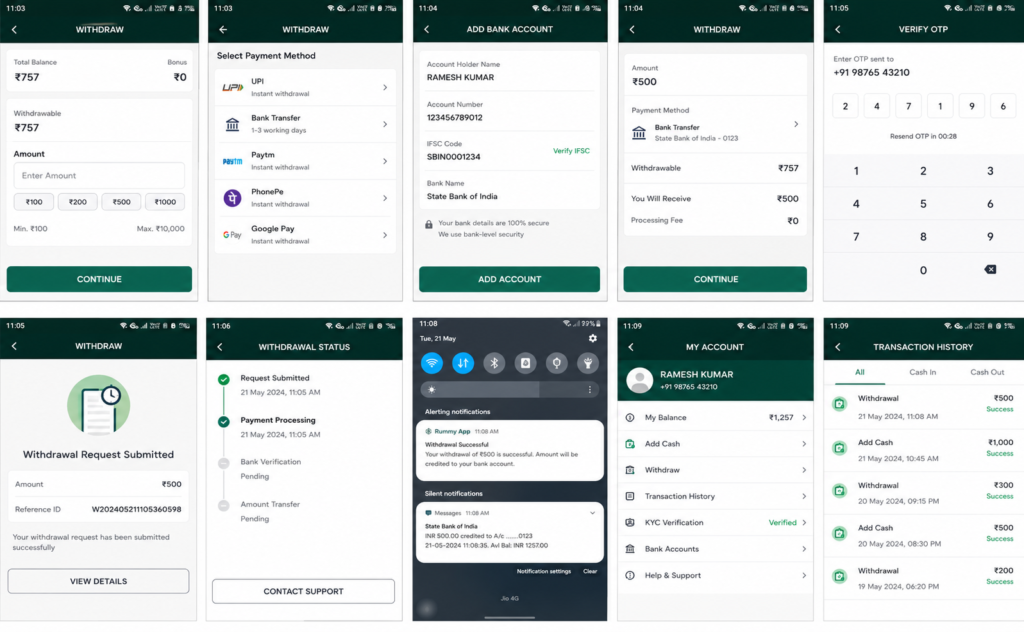
What I Upload First
PAN card first, then bank proof, then the selfie match — in that order, since I’ve noticed apps tend to process the PAN check fastest, and clearing it first tends to unblock the rest of the profile more quickly too. It’s a small sequencing trick, but it’s worked well for me every time.
Match Your Bank Details Exactly
This is the one I mentioned above, and it’s genuinely worth repeating because it prevents so many problems on its own: the name on your bank account or UPI ID has to match the name on your KYC documents, letter for letter. I always double-check this in my bank’s own app before entering it anywhere else — an extra minute here is what prevents a rummy app withdrawal verification failure later, and it’s honestly one of the easiest wins in this entire guide.
Check the App’s Own Withdrawal Policy Page
Every legitimate app I’ve used has a dedicated withdrawal or payments policy page — usually tucked into the footer or the account settings, and well worth the two minutes it takes to find. I always skim it for three numbers before withdrawing: the minimum withdrawal amount, the daily or monthly withdrawal limit, and the stated processing window. Knowing those numbers up front means I’m never confused about why a request didn’t go through instantly, and it turns what could feel like an anxious wait into a simple, predictable countdown.
How to Withdraw Money Safely from Rummy Apps: Step-by-Step
This is the exact rummy app withdrawal process I follow, app after app, and I’ve come to genuinely appreciate how similar it is everywhere — once you’ve done it once, you’ve basically done it everywhere. The screens look a little different depending on the platform, but the underlying steps are reliably consistent.
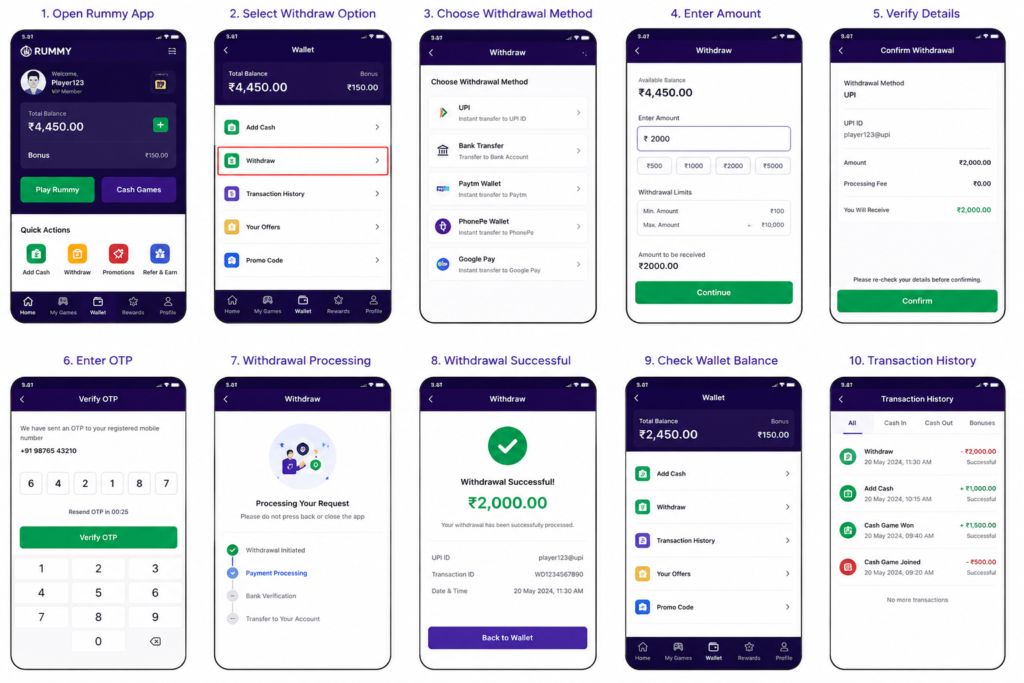
Step 1: Verify Your Account Is Fully KYC-Approved
Before I do anything else, I open the account or wallet section and confirm my KYC status reads as “verified” or “approved,” not “pending.” If it’s still pending, I simply wait it out rather than requesting a withdrawal, since a pending KYC status is the most common reason a request gets held — and in my experience, that pending window is usually short and resolves on its own without any action needed from me.
Step 2: Choose Your Withdrawal Method
Most apps I’ve tested offer UPI and direct bank transfer, and a few still offer e-wallet options too, which I always find is a nice bit of flexibility. I pick whichever one I’ve already verified — switching to an unverified payment method mid-withdrawal is one of the fastest ways to trigger extra review, so sticking with what’s already confirmed keeps things moving quickly.
H4: UPI vs Bank Transfer — Which I Pick First
If both are verified, I default to UPI purely for speed, and it’s rarely let me down. I only fall back to bank transfer when an app’s UPI option is temporarily unavailable, and even then, it’s just a matter of waiting a bit longer rather than dealing with any real complication.
Step 3: Enter the Withdrawal Amount
I always check the minimum withdrawal amount and daily limit before typing in a number, since it takes just a few seconds and avoids an entirely avoidable hiccup. Entering an amount above the stated limit is a common, completely fixable reason a withdrawal request gets rejected outright, and it’s an easy one to sidestep once you know the numbers.
Step 4: Confirm With OTP or PIN
Every app I trust asks for OTP verification sent to my registered mobile number before releasing funds, and I’ve come to genuinely welcome this step rather than see it as a hurdle. I treat this as a good sign — it’s the same layer of account verification your bank uses, and it means someone else can’t drain your balance even if they get into your account. It’s one of the clearest signs that a platform takes your money seriously.
Step 5: Track the Withdrawal Status
Once I submit the request, I screenshot the confirmation screen and note the transaction ID — a habit that takes about ten seconds and has paid off again and again. Then I check the withdrawal status from the transaction history tab rather than assuming it went through instantly, and that one habit has made every support conversation I’ve ever had shorter, calmer, and a lot more productive.
Rummy App Payment Methods Compared
Here’s how the payment methods I’ve actually used stack up against each other, based on my own withdrawal attempts rather than marketing copy. All three of these have worked reliably for me overall, so this is really about picking the best fit for your situation rather than avoiding a bad option.
| Payment Method | Typical Speed | What I’ve Noticed |
| UPI | Minutes to a few hours | Fastest option in my experience; occasional short delays during bank server maintenance windows, otherwise very dependable |
| Bank Transfer (IMPS/NEFT) | A few hours to 1-2 business days | Reliable and steady, just a touch slower than UPI and dependent on your bank’s processing hours |
| E-wallets | Minutes to a few hours | Convenient and quick for smaller amounts; a nice option when an app supports the wallet you already use |
Rummy App Withdrawal Limits and Processing Time
Withdrawal limits vary quite a bit from app to app, and they can also change based on your KYC tier — usually in your favor the more of your profile you’ve verified. As a general pattern across the platforms I’ve reviewed, including Yono Rummy, Boss Rummy, INR Rummy, and Rumble Rummy, I’ve found the numbers to be genuinely reasonable rather than restrictive:
- Minimum withdrawal amounts commonly sit in a modest, low range, so even smaller cash-outs aren’t blocked — a detail I appreciate.
- Daily or per-transaction limits are usually higher for fully KYC-verified accounts than for partially verified ones, which is a nice incentive to finish verification early.
- Processing time windows are almost always stated clearly on the app’s payments page — I treat anything beyond that stated window as worth a quick support ticket, not a five-minute worry, because the wait is rarely long.
Common Rummy Withdrawal Problems (and How I’ve Fixed Them)
I want to walk through these calmly, because in almost every case I’ve run into, the fix has turned out to be simple and quick once I knew where to look.
Why Is My Rummy Withdrawal Pending?
Nine times out of ten when I’ve seen this, it comes down to one of three things: KYC still under review, a bank server delay outside the app’s control, or a name mismatch between the withdrawal account and the KYC documents. All three are easy to check and, more importantly, easy to fix. My first move is always to recheck KYC status before contacting support, and that alone resolves the mystery most of the time.
My Exact Troubleshooting Order
KYC status first, then account name match, then transaction history, and only then a support ticket — in that order, since it resolves the issue without any wait most of the time, and keeps the whole process feeling manageable rather than stressful.
Rummy App Withdrawal Verification Failed
This almost always traces back to mismatched details — a maiden name versus a married name, a missing middle name, or a small typo in the account number. The good news is that it’s a completely fixable, one-time correction: I update my KYC documents to match my current bank details exactly, then resubmit, and it clears up right away.
Failed UPI Transaction During Withdrawal
When a UPI withdrawal fails outright, I check whether my UPI ID is still linked to an active bank account, since banks occasionally deactivate old UPI handles in the background without much notice. Re-linking or re-registering the UPI ID has resolved this every single time for me, usually within a couple of minutes.
Withdrawal Amount Exceeds the Limit
If a request bounces back for this reason, I simply split it into two smaller withdrawals within the daily limit rather than resubmitting the same amount and expecting a different result. It’s a quick workaround, and both withdrawals still land within the app’s normal processing window.
Rummy App Withdrawal Security Tips
These are the habits I’ve built into my own routine for secure rummy app payments, and I genuinely think they make the whole experience feel safer and more relaxed rather than more effortful:
- Only download rummy apps from the official Play Store, App Store, or the platform’s verified website — never a random APK link, since the official channels already do a layer of safety checking for you.
- Never share your OTP, password, or account PIN with anyone, including someone claiming to be app support — genuine support teams never need it.
- Use a bank account or UPI ID that’s actively monitored, so you’ll notice any unexpected activity immediately and can act on it right away.
- Keep your KYC documents and app login separate from any device you don’t fully control, which is an easy habit once it’s set up.
- Screenshot every withdrawal confirmation and keep transaction IDs until the money actually lands in your account — a small habit with a genuinely good payoff.
- Check the app’s official social media or support page directly if you’re ever unsure whether a message asking for details is genuine — it takes a minute and gives real peace of mind.
A Quick Note on Responsible Gaming
I want to be upfront about something, and I think it’s a positive thing to be clear about: rummy apps that involve real money are a form of real-money gaming, and the legal position on these platforms varies by state in India. I’d always recommend confirming your local rules before depositing or withdrawing, playing only what you can comfortably set aside, and treating any app that pressures you to deposit more as a red flag rather than an opportunity. Keeping this mindset has made my own experience with these apps a lot more enjoyable and a lot less stressful. None of this article is meant as financial or legal advice — it’s simply what I’ve learned from using these platforms myself.
Expert Tips
- Complete KYC on day one, not withdrawal day — it removes the vast majority of the friction I used to run into, and it’s genuinely a five-minute task.
- Keep one payment method as your default and stick with it, rather than switching between UPI and bank transfer — consistency has made my own withdrawals noticeably smoother.
- Note the app’s stated processing window before you withdraw, so you know exactly when to actually start checking in — and, just as importantly, when not to worry yet.
Conclusion
If there’s one thing I want you to walk away with, it’s this: how to withdraw money safely from rummy apps really comes down to preparation, not luck, and it’s a lot more manageable than it might seem at first. Verify your KYC early, make sure your bank or UPI details match exactly, stay inside the app’s stated limits, and keep a screenshot trail. I’ve used that same rummy withdrawal guide across apps like Yono Rummy, Boss Rummy, INR Rummy, and Rumble Rummy, and it’s genuinely the reason my withdrawals go smoothly far more often than not. Once these habits are in place, withdrawing becomes the easy, satisfying last step — not something to dread.
This guide on How to Withdraw Money Safely from Rummy Apps is intended for informational and educational purposes only. Based on my experience, the safest approach is to use verified rummy platforms, complete the required KYC process, link only your own bank account or UPI ID, and review the withdrawal policy before submitting any request.
Processing times, verification requirements, supported payment methods, and withdrawal limits may vary from one app to another. I always recommend reading the platform’s official terms and payment guidelines before initiating a withdrawal.
Before requesting a withdrawal, make sure your KYC verification is complete, your bank account or UPI details match your registered identity, and two-factor authentication or OTP verification is enabled if available. Double-check the minimum withdrawal limit, expected processing time, and transaction history to avoid unnecessary delays.
Online rummy platforms are intended only for users aged 18 years or older. Laws related to online gaming differ across Indian states. Before registering, depositing, or withdrawing funds, confirm that the platform is legally accessible in your location and always play responsibly within your personal limits.
© 2026 Safe Rummy Withdrawal Guide. All trademarks, logos, application names, and related assets belong to their respective owners. This content is published for educational and informational purposes only and should not be considered legal, financial, or professional advice. Withdrawal policies, verification requirements, and payment processing times may vary depending on the platform and applicable regulations.