BHIM Review – My Honest Experience Using This UPI Payment App
I still remember the first time I downloaded the BHIM app. It was right after demonetization, and everyone around me was scrambling for digital payment solutions. A friend casually mentioned it, and out of curiosity, I gave it a shot. Fast forward to today, and I have used it dozens of times for everything from splitting bills to paying at local kirana stores. So when someone asks me for a BHIM review, I actually have a lot to say from personal experience, not just from reading specs online.
This BHIM review is my genuine attempt to walk you through what the app is, how it works, what I liked, what frustrated me, and whether it is actually worth your time in 2025. Let’s get into it.
What is BHIM App?
BHIM stands for Bharat Interface for Money. It was launched by the National Payments Corporation of India (NPCI) in December 2016 to promote cashless transactions across the country. The BHIM payment app is built on the UPI (Unified Payments Interface) platform, which means it lets you send and receive money directly between bank accounts in real-time, without needing to add a beneficiary or go through any complicated banking steps.
What sets it apart from apps like Paytm or PhonePe is that BHIM is a government-backed app with no wallet involved. Your money goes straight from your bank account to the recipient’s. Simple, direct, and transparent.
My First Impression of BHIM
Honestly, my first impression was a mix of relief and mild confusion. Relief because the BHIM app download was quick — the file size is small and it installs within seconds even on a mid-range phone. Mild confusion because the interface, especially in the earlier versions, was pretty bare-bones.
But once I got past the initial setup, things got much smoother. And in my opinion, the simplicity was actually the point.
Interface and User Experience
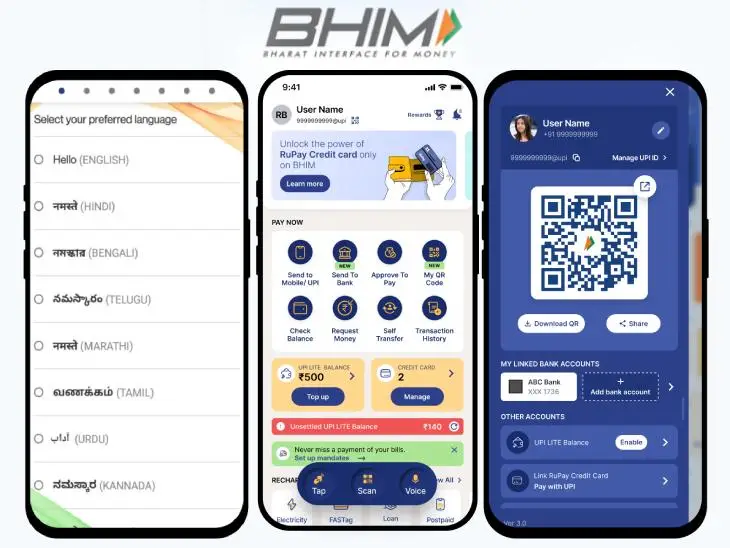
The BHIM app features a clean, minimal design. There are no flashy animations or overwhelming menus. When I first opened it, the home screen showed me the basic options: Send, Receive, Scan & Pay, and Transactions. That’s it. No clutter.
I personally liked how lightweight the whole experience felt. On a day when I’m in a hurry and just need to transfer money quickly, I don’t want to scroll past five promotional banners. BHIM doesn’t do that. The UPI interface is clean and functional.
The font sizes are readable, buttons are large enough for easy tapping, and navigation between screens is smooth. I never felt lost inside the app, which is honestly a big deal when you’re dealing with financial transactions.
BHIM Registration Process
The BHIM registration process is straightforward. When I set it up, all I had to do was verify my mobile number (which had to be linked to my bank account), choose my bank from a list, and set a UPI PIN. The whole thing took me about four to five minutes.
One small tip: make sure the SIM card you’re using is inserted in the phone during setup. BHIM sends a verification SMS automatically, and if your SIM is in a different device, the process can get tricky. I learned this the hard way when I switched phones mid-setup.
Once registered, the app creates your UPI ID in the format of your mobile number followed by @upi, which is honestly one of the easiest IDs to remember and share.
Features I Personally Liked in BHIM
There are a few BHIM app features that genuinely stood out during my regular use. Let me break them down.
Fast UPI Transactions
In my BHIM transaction experience, the speed has been consistently good. Most transfers go through within seconds. I’ve used it to split a dinner bill, pay for vegetables at a street stall, and even send money to a family member in another city. Each time, the money arrived almost instantly.
Of course, like any UPI app, the speed does depend on server load. There have been times — usually on bank holidays or during peak hours — when transactions took a little longer or failed. But that’s a system-wide issue, not specific to BHIM.
QR Code Payments
One thing I noticed and really appreciated is the QR code payment feature. At most shops in my neighbourhood, the shopkeeper just shows me a QR code, I scan it with BHIM, enter the amount, and done. It is incredibly fast and requires no manual entry of UPI IDs or bank details.
You can also generate your own QR code for a specific amount if someone needs to pay you back. This is great for informal transactions where you don’t want to awkwardly ask someone to type in your UPI ID.
BHIM App Security Features
Security was one of my biggest concerns when I started using any digital payment app, and in this BHIM review, I’m glad to say the app does a solid job here. Every transaction requires a UPI PIN, which only you know. There is no way to complete a payment without it.
Additionally, the app also supports fingerprint authentication on compatible devices, which adds another layer of convenience without compromising safety. I enabled it immediately and it has made the experience much smoother.
The app is also tied to your registered mobile number and device, which means someone cannot just log in from another phone without your SIM. This device-binding is a smart security feature.
BHIM Cashback and Rewards Experience
Let me be honest here: if you’re expecting heavy BHIM cashback and reward programs like you see on Paytm or PhonePe, you might be a little disappointed. BHIM is not really a rewards-heavy app by design.
That said, NPCI has periodically run cashback campaigns and lucky draw promotions through the app. I did participate in one such promotion early on and received a small cashback, which was a pleasant surprise. These offers come and go, so it’s worth keeping an eye on the app’s notification section or the official BHIM website for updates.
If you’re someone who primarily uses payment apps for the rewards ecosystem, BHIM may feel a bit plain. But if you value reliability and a clean BHIM UPI review experience over constant promotional noise, then it is exactly what you need.
Pros and Cons of BHIM
After using the app over a long period, here is my honest take on the BHIM app pros and cons.
Things I Personally Liked
- Government-backed and trustworthy: Knowing this is a NPCI product gives me peace of mind.
- No wallet required: Money transfers happen directly between bank accounts.
- Lightweight app: Does not eat up storage or RAM, works well on budget phones.
- Works with multiple banks: I linked two of my accounts and switch between them seamlessly.
- Simple BHIM registration process: Fast onboarding with minimal steps.
- Available in multiple Indian languages: Great for regional users who are more comfortable in their native language.
Areas Where I Felt Improvement Is Needed
- Limited rewards and cashback: Compared to competitors, the BHIM cashback ecosystem is much smaller.
- Occasional server downtimes: Usually on high-traffic days, transactions can fail or hang.
- Basic UI compared to rivals: PhonePe and Google Pay feel more polished visually.
- No in-app recharges or bill payments at the same depth as competitors.
- Customer support can be slow when you face a failed transaction or grievance.
Is BHIM Safe to Use?
This is the question I get asked the most whenever I recommend this app to someone: is BHIM safe? And from my personal experience, yes, it absolutely is, as long as you follow basic digital hygiene.
The BHIM UPI review on this front is positive. Your money is protected by multiple layers: your UPI PIN, your device lock, and in many cases, your fingerprint. As long as you keep your PIN private and do not click on suspicious links or respond to phishing calls asking for your PIN, the app is very secure.
One thing I personally liked is that BHIM never asks you to enter your PIN to ‘receive’ money. This is something fraudsters try to exploit by asking people to scan QR codes or enter PINs on the pretext of receiving payments. BHIM’s own interface makes it clear that receiving money requires no PIN — a simple but powerful safety prompt.
My Final Thoughts on Security and Reliability
In this BHIM review, I can confidently say that the app’s security is robust for everyday use. It is not bulletproof against social engineering attacks — but no app is. The responsibility partly lies with the user. Stay informed, never share your PIN, and you’ll be fine. My overall BHIM transaction experience over the years has been safe and incident-free.
Final Verdict – Is BHIM Worth Using?
After years of using it on and off, this is my final BHIM review verdict: yes, it is absolutely worth using, especially if you want a no-frills, trustworthy, government-backed payment app for your daily transactions.
Is it as feature-rich as PhonePe or Google Pay? No. Does it have the same rewards ecosystem as Paytm? Not quite. But if you ask me, that is not necessarily a bad thing. BHIM does exactly what it promises — fast, secure, direct UPI transfers — and it does it well.
The BHIM app download is free, the setup is simple, and the BHIM registration process is among the easiest I have seen for any financial app. For people who are new to digital payments or prefer a minimalist experience, I would recommend starting with BHIM.
For power users who need advanced features, bill payments, investments, and heavy cashback — BHIM can still serve as a reliable secondary app, especially since it works seamlessly with virtually every bank in India.
In my honest BHIM app review, I give it a solid 4 out of 5 stars for reliability, security, and ease of use. It might not win on bells and whistles, but it wins where it counts most: getting your money from point A to point B safely and quickly.
If you haven’t tried it yet, the BHIM app download is just one tap away on the Play Store or App Store. Give it a go, especially for those everyday transactions where you just want things to work without drama.